Somewhere around 2023, a friend of mine who runs a small furniture restoration business in Manchester told me she’d never be able to afford proper video marketing. A single decent product video, Text to Video AI quoted by a local videographer, would have cost more than her entire month’s marketing budget. So she stuck with photos, the occasional shaky phone clip, and hoped for the best.
I caught up with her recently. She’s now generating short, polished product showcase videos from text prompts and a handful of reference photos, in an afternoon, for less than the cost of a nice dinner out. The quality isn’t quite Hollywood. It doesn’t need to be. It’s good enough to stop people scrolling, which is the only bar that actually matters for her business.
That shift from “video production requires a crew, a studio, and a serious budget” to “video production requires a laptop and a clear idea” is what text-to-video AI has done in an astonishingly short window of time. This article is about understanding that technology well enough to actually use it, rather than just being impressed by demo reels on social media.
What Text-to-Video AI Actually Is
Text-to-video AI tools convert written descriptions into fully rendered video clips using generative AI models. You type a description of a scene, the camera movement, the lighting, the mood and the system generates an entirely new video that didn’t exist before, frame by frame, built from patterns it learned during training rather than stitched together from existing footage.
This is worth sitting with for a second, because it’s genuinely different from older video technology. This isn’t templated motion graphics with your text dropped in. It isn’t stock footage matched to keywords. The system is generating original visual content water that splashes with correct physics, fabric that drapes naturally, light that casts believable shadows based purely on a written prompt and whatever it learned from enormous volumes of training video during development.
How These Models Actually Learn to Generate Video
Without diving into the deep technical weeds, it’s worth understanding the basic mechanism, because it explains both why these tools are remarkable and why they still have real limitations.
Modern text-to-video systems are trained on vast datasets of video paired with descriptions, learning statistical patterns about how the visual world behaves how objects move, how light interacts with surfaces, how a camera typically pans across a scene, how a person’s expression shifts during a conversation. During generation, the model essentially predicts, frame by frame, what should plausibly come next given your prompt and everything it learned during training.
This is why these tools sometimes produce results that are visually stunning but subtly wrong in ways a careful eye will catch — a hand with an extra finger, a reflection that doesn’t quite match what it’s supposed to be reflecting, a piece of text on a sign that dissolves into nonsense. The model isn’t simulating physical reality. It’s predicting what reality statistically tends to look like, which is remarkably good but not infallible.
The Major Text-to-Video AI Tools Worth Knowing
The field has moved quickly, and several genuinely strong options now exist, each with a different sweet spot. Here’s an honest breakdown.
Sora (OpenAI)
Sora’s output quality represents a visible step above many competing text-to-video tools, with particularly strong physics simulation water splashes realistically, fabric drapes correctly, and camera movements follow natural cinematographic patterns. Lighting tends to be a standout strength, with accurate shadow casting and reflections that competing tools frequently get wrong.
Sora is publicly accessible through a ChatGPT Plus subscription, and its tight integration with ChatGPT allows for iterative prompt refinement within a conversational workflow you can describe a scene, see the result, and adjust your description in natural back-and-forth dialogue rather than fiddling with a separate technical interface.
The honest limitation: usage caps on standard plans mean you can burn through your generation quota fast during iterative creative work, which matters if your process involves a lot of trial and error before landing on a final result.
Video (Google)
Video’s defining strength is steerability it excels at interpreting complex prompts and adhering closely to both text and image references, which matters enormously if you have a specific vision rather than a vague mood you’re hoping the AI interprets well. The combination of strong realism, good motion, and native synchronized audio generation makes Video feel like one of the most complete tools currently available.
Google has made Veo accessible with free credits through Google AI Studio and the Gemini app, which gives it a meaningfully lower barrier to entry than tools that are entirely subscription-gated.
Kling AI
Kling has built a reputation as a genuinely strong value option competitive quality without the premium pricing of some competitors, plus a notably generous free tier and one of the better mobile experiences in the category. For creators who need to run a lot of iterations without burning through an expensive credit allowance, Kling’s economics are a real advantage.
Runway
Runway has carved out a distinct identity as the tool for creative professionals who want genuine control rather than one-shot generation. It offers more granular editing capability adjusting specific elements of a generated clip, working with structured prompting, and integrating into broader post-production workflows making it the more natural fit for teams already doing serious video editing rather than producing standalone short clips.
A Note on Image-to-Video Versus Pure Text-to-Video
Here’s a practical distinction that matters more than most beginner guides mention: pure text-to-video tools are excellent for storyboarding, B-roll, and creative exploration, but image-to-video tools where you start from your own product photo or reference image and animate it currently offer more consistency and brand control for commercial work like advertising.
If you’re generating a video for genuine creative or conceptual purposes, text-to-video gives you the most freedom. If you’re trying to animate a specific product, a specific person, or maintain visual consistency with existing brand assets, starting from your own image and animating it tends to produce more reliable, on-brand results than describing the scene entirely in words and hoping the AI matches your existing visual identity.
Quick Comparison: Choosing Your Tool
| Tool | Standout Strength | Access | Best For |
|---|---|---|---|
| Sora | Physics realism, lighting accuracy | ChatGPT Plus ($20/month) | Cinematic clips, iterative refinement |
| Veo | Prompt steerability, native audio | Free credits via Gemini/AI Studio | Complex, specific creative visions |
| Kling | Value, generous free tier | Free tier + paid plans | High-volume iteration on a budget |
| Runway | Editing control, pro workflows | Subscription-based | Teams doing structured post-production |
A Practical Workflow for AI Video Production
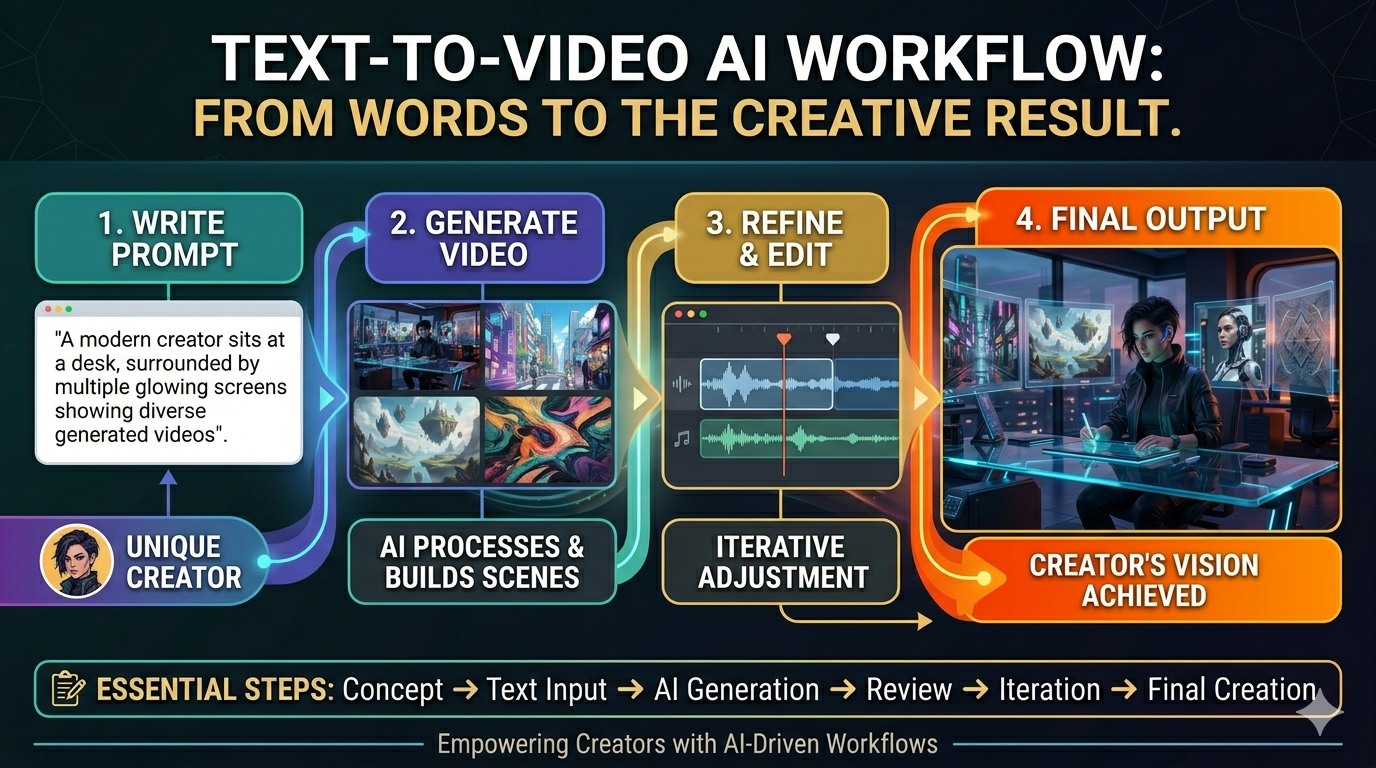
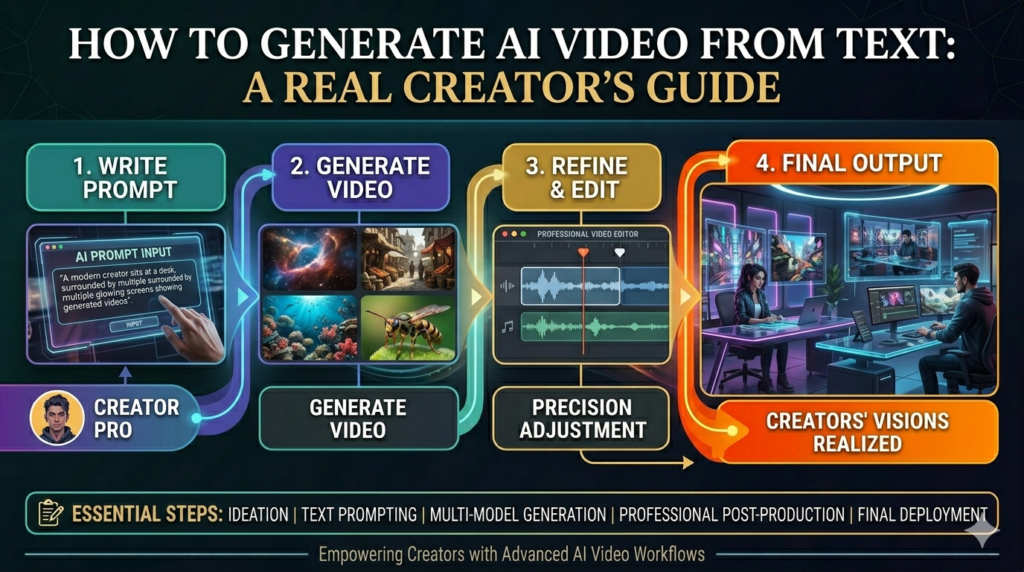
Having the right tool is only part of the equation. Here’s the actual process that separates a usable result from a frustrating afternoon of regenerating the same clip twelve times.
Step One: Write Your Prompt Like a Director, Not a Caption
The single biggest mistake beginners make is writing prompts the way they’d write an Instagram caption — short, vague, evocative. “A peaceful morning in a coffee shop” gives the model almost nothing concrete to work with, and you’ll get a generically pleasant but unremarkable result.
A genuinely useful prompt specifies the subject, the action, the camera behavior, the lighting, and the mood, in roughly that order. Something closer to: “A slow tracking shot moving left to right across a small, sunlit coffee shop counter. Steam rises gently from a ceramic cup. Warm morning light streams through a window in the background, slightly out of focus. The camera movement is smooth and unhurried, like a quiet establishing shot in a film.” That’s a prompt with enough specificity for the model to produce something close to what you actually had in mind.
Step Two: Treat the First Generation as a Draft, Not a Final Answer
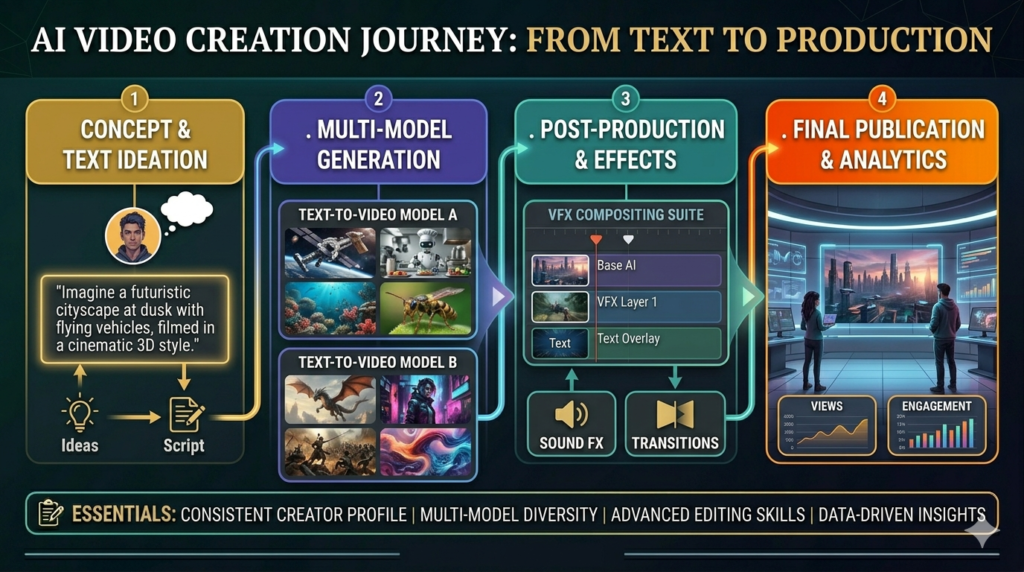
Even with a well-constructed prompt, your first generated clip is rarely your final one. Professional users of these tools build in iteration as a default expectation, not a sign that something went wrong. Adjust your wording, try a different phrasing for the camera movement, specify the lighting more precisely if the result feels flat. Most platforms make it cheap and fast to regenerate variations, and the difference between a mediocre result and a genuinely impressive one is often three or four iterations of prompt refinement.
Step Three: Understand the Length and Resolution Limits You’re Working Within
Most current text-to-video tools generate clips in the range of a few seconds up to roughly 30 seconds, depending on the platform and plan. This matters for planning your content. If you need a 90-second product video, you’re not generating that in a single pass you’re generating a series of shorter clips and assembling them in an editing tool afterward, the same way a traditional video shoot involves multiple takes edited together.
1080p has become a fairly standard baseline output resolution across the major platforms, with 4K becoming increasingly accessible on premium tiers. Match your resolution expectations to your actual platform content destined for Instagram Stories has very different requirements than content meant for a website hero video.
Step Four: Plan for the Audio Separately (Usually)
Most text-to-video tools are still primarily video-first, with audio added as a separate step, though this is changing. Some newer models now generate synchronized audio and video together, which is a genuine leap forward ambient sound, dialogue, and even music that actually matches the visual content, rather than requiring a separate audio production pass entirely.
If your chosen tool doesn’t generate audio natively, plan your workflow accordingly: generate the visual clip first, then layer in music, sound effects, or voiceover using a separate audio tool or simple video editor afterward.
Step Five: Edit, Don’t Just Generate and Publish
This is the step beginners skip most often, and it’s the one that separates amateur-looking AI video from genuinely polished output. Even a strong generated clip benefits from basic editing: trimming the first and last frames where AI generation sometimes gets visually unstable, color grading for consistency if you’re combining multiple clips, adding text overlays or captions, and pacing the overall sequence so it doesn’t feel like a series of disconnected AI generations stitched together with no rhythm.
Where AI Video Production Genuinely Works Right Now
Let’s get specific about realistic use cases, because the gap between “technically impressive demo” and “reliable production tool” varies enormously by application.
Storyboarding and pre-visualization. This is one of the strongest current use cases. Filmmakers and ad agencies are using text-to-video tools to rapidly visualize concepts before committing to expensive traditional production testing camera angles, pacing, and mood in minutes rather than days.
B-roll and supplementary footage. Background shots, establishing scenes, and transitional footage that doesn’t need to feature specific people or exact products are well within current capability, and genuinely save time compared to licensing stock footage or arranging a separate shoot.
Social media content at small business scale. For businesses without traditional video production budgets, AI-generated short clips product showcases, mood pieces, simple narrative content — have become genuinely usable for platforms like Instagram, TikTok and short-form YouTube content.
Concept and pitch visualization. Marketing teams pitching campaign ideas internally, or agencies presenting concepts to clients, are increasingly using AI video to show rather than describe an idea, which tends to land far better in a pitch meeting than a written treatment alone.
Where it’s still shakier: direct-response advertising requiring precise, consistent brand representation; any content requiring a specific real person’s likeness to be perfectly consistent across multiple shots; and content where small physical inaccuracies (an extra finger, distorted text, an inconsistent logo) would be genuinely costly or embarrassing if they slipped through review.
The Honest Limitations You Should Plan Around
Consistency across clips remains genuinely difficult. Getting the same character, product, or setting to look identical across multiple separately generated clips is one of the field’s persistent challenges. If your project depends on visual consistency a recurring character, a specific product appearing correctly every time budget extra iteration time and review carefully.
Fine details still misfire. Hands, text within the scene, and complex interactions between multiple moving elements remain the areas most likely to produce visible errors, even in the strongest current models. Review generated content carefully before publishing, particularly anything with readable text or detailed hand movements.
Cost can scale faster than expected. Light, occasional use can stay genuinely affordable, often in the range of a basic streaming subscription. But heavy users can burn through budgets quickly, since most serious video tools charge by credits, clip length, or premium plan access the real cost driver is iteration volume, not the headline subscription price.
Watermarking and provenance are becoming standard. Several major platforms now embed invisible digital watermarks in generated video specifically to support content authentication and combat misuse worth knowing if your use case involves any sensitivity around disclosure or content provenance.
The legal and ethical landscape is still settling. Questions around using AI to generate video featuring real people’s likenesses, the copyright status of AI-generated video, and disclosure requirements for AI-generated marketing content are all still being actively worked out in both the US and UK. If you’re using this technology commercially, particularly involving anything resembling a real person, it’s worth staying current on the relevant guidance rather than assuming yesterday’s rules still apply.
Frequently Asked Questions
Q: Do I need any video editing experience to use text-to-video AI? No, not to generate individual clips — the prompt-based interface is designed for people without technical production backgrounds. You’ll get more polished final results, though, if you combine AI generation with at least basic editing skills for trimming, sequencing, and adding audio or text overlays afterward.
Q: How much does it actually cost to produce a short AI video? This varies significantly by tool and usage volume. Entry-level access to platforms like Sora (through ChatGPT Plus) starts around $20 a month, and some tools like Veo and Kling offer meaningful free tiers or credits. For light, occasional use, costs can stay genuinely modest. Heavy iterative use, particularly on premium models with longer clip lengths, can scale into hundreds of dollars monthly, since most platforms charge by generation volume or clip length rather than a flat fee.
Q: Can AI-generated video include real people, like a spokesperson for my business? This is technically possible with certain tools, particularly those built around photo-to-video animation with lip-sync capability, but it raises genuine consent, likeness rights, and disclosure considerations that vary by jurisdiction and platform terms of service. If you’re considering this for commercial use, review the specific platform’s policies and applicable likeness rights law directly rather than assuming it’s automatically permitted.
Q: How long can AI-generated video clips actually be? Most current tools generate clips ranging from a few seconds up to roughly 30 seconds in a single generation, depending on the platform and plan tier. Longer content is produced by generating multiple clips and editing them together, similar to how traditional video production combines multiple shots.
Q: Is text-to-video AI good enough for professional advertising? It depends on the application. For storyboarding, concept visualization, and B-roll, the technology is genuinely production-ready. For polished, brand-consistent direct-response advertising requiring precise product representation, many practitioners currently favor image-to-video tools which animate your own product photos rather than generating an entirely new scene from text because they offer more reliable brand consistency.
Q: Will AI video generation replace traditional video production? Unlikely to fully replace it, at least in the near term, though it’s already replacing certain categories of work particularly low-budget content, quick social media clips, and early-stage concept visualization that previously required either skipping video entirely or accepting low production value. Complex productions requiring precise creative control, specific real locations, and exact brand consistency still generally benefit from traditional production, sometimes blended with AI-generated elements.
A Final Thought
What’s genuinely remarkable about text-to-video AI isn’t just the technical achievement, though that’s considerable. It’s what the technology has done to the economics of who gets to make video content at all.
For most of video production’s history, the gap between “having an idea for a video” and “having a finished video” required money, equipment, and specialized skill that most individuals and small businesses simply didn’t have. That gap has narrowed dramatically, and it’s narrowing further every few months as these tools improve.
The honest caveat, the one worth carrying forward from everything above, is that the gap between generating a video clip and producing genuinely good video content hasn’t closed nearly as much. The tools handle the mechanical difficulty. The creative judgment knowing what to prompt for, recognizing when a result isn’t working, editing the pieces into something coherent still depends entirely on you.
That’s actually good news. It means the thing that makes video production valuable was never really the technical barrier in the first place. It was always the idea, the eye, and the judgment behind it. Now more people finally have the tools to act on that.
Read more about Writing Website